

Document management system: From chaos to control in 2026

There is almost always an employee somewhere in the organisation searching for the same file for the third time. A procedure is stored as a PDF in an old email thread. A newer version might exist on the shared drive. A local copy resides on a laptop. No one knows for sure which one is valid.
That is where document chaos starts to cost. Not just in terms of time, but in errors, repeated questions and daily uncertainty. A new employee is looking for onboarding material. A manager sends the same guide over and over again. An operations employee uses a document that should have been decommissioned long ago.
A modern document management system does not primarily solve an IT problem. It solves a governance problem. The question is simple: How do we ensure that employees can find the right information, at the right time, without guessing?
Introduction: Does the right file exist in an email or on the shared drive?
The most recognisable sign of a poor document setup is not the technology. It is behaviour. Employees ask each other before they search. They save local copies because they do not trust that the central version can be found. They forward attached files because it feels quicker than sharing a link.
The consequence is rarely dramatic on day one. It creeps up on you. HR answers the same questions about policies. Operations manually distributes procedures across multiple channels. Local managers become backup search engines for everything others cannot find.
Before and after in everyday reality
Before a proper setup, everyday life often looks like this:
Onboarding goes in circles: The new employee receives five different documents from three different people.
Operations works under uncertainty: Technicians and drivers use whichever document they happen to find first.
Management loses visibility: No one can quickly determine who owns a document or when it was last reviewed.
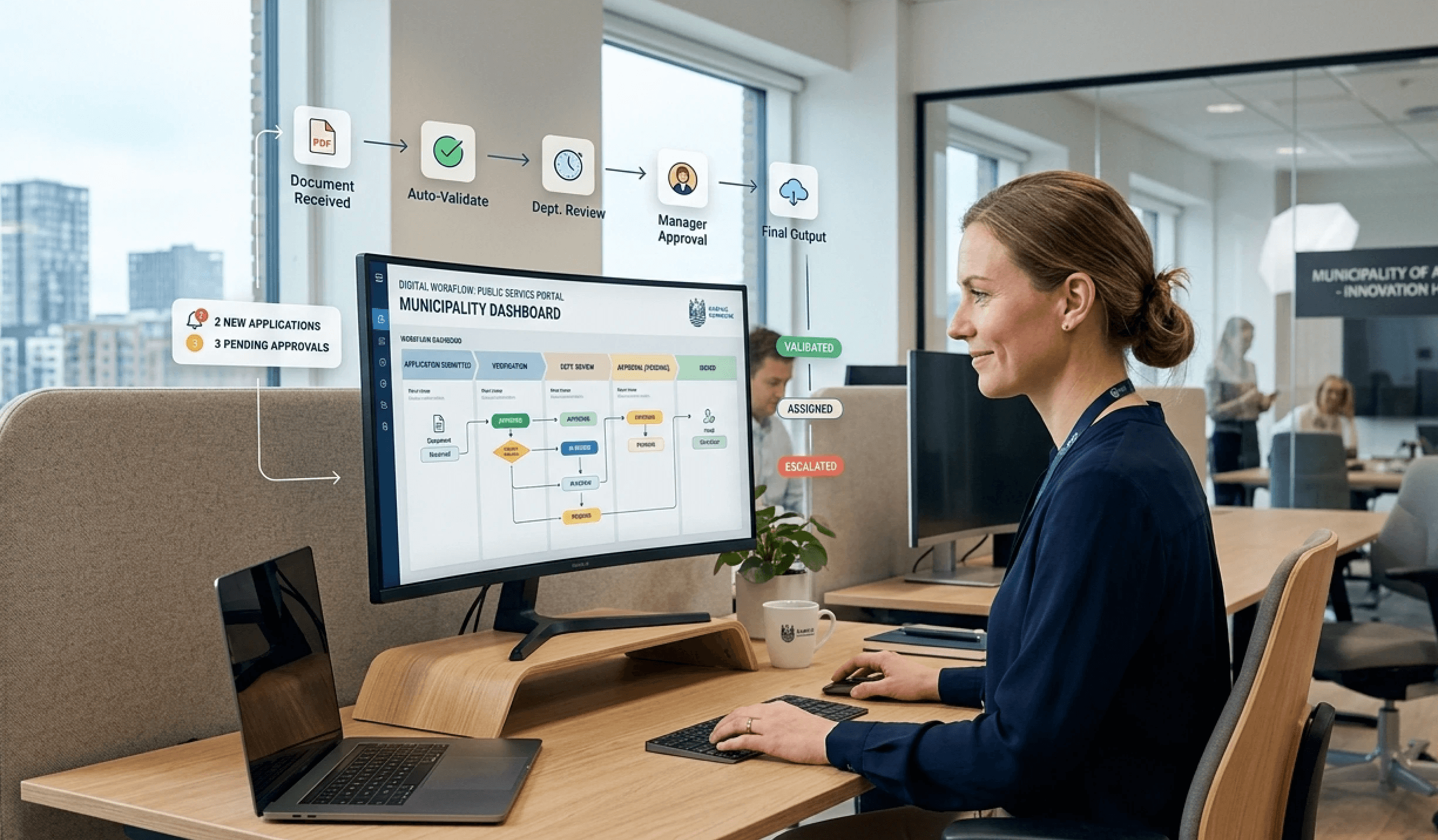
After a strong document management system is implemented, the picture changes. Employees know where the valid version is located. Documents are accessed centrally instead of being downloaded and shared further. Ownership, access and review are agreed upon in advance.
Document structure is not just about folders. It is about governance, ownership and trust in the system actually showing the valid version.
This is also why many implementations fail. The organisation buys features but does not change habits, responsibilities or rules. Then the mess simply moves from the shared drive to a new platform.
What is a modern document management system?
A modern document management system is not just a place where files are stored. It is a system that governs how documents are created, classified, approved, updated, found and archived.
A shared drive can be compared to a basement full of boxes. The things are probably in there somewhere, but no one knows exactly where. A DMS is more like a library with a catalogue, rules and responsibility. The user does not just find a file. The user finds the valid file, in the correct context.
A shared drive is storage. A DMS is control
The difference becomes clear when the organisation grows or operates under security and documentation requirements. A shared drive can easily hold many files. It can rarely handle version control, ownership, targeting and audit trails in a way that employees can actually use in their everyday work.
That is why simple file storage environments rarely solve the actual problems. They store documents, but they do not remove the doubt about what is valid. They do not prevent local copies. They do not automatically create ownership.
The three disciplines that make the difference
In Denmark, document management systems typically support Document Management, Compliance Management and Content Management, with Document Management being the heart of the solution. In Danish companies, municipalities and hospitals, systems are designed to optimise document handling through business process automation, reduce risks and increase traceability in alignment with ISO 27001 and ISAE 3000 in high-security environments and public-sector organisations, as described by Simplitize on document management.
This can be translated into three practical layers:
Discipline | What it does | What goes wrong without it |
|---|---|---|
Document Management | Controls versions, lifecycle and placement | Multiple parallel versions coexist side by side |
Compliance Management | Controls access, traceability and oversight | Sensitive documents circulate too freely or too obscurely |
Content Management | Makes content searchable, targeted and usable | Employees cannot find what they need |
Practical rule: If employees are still asking colleagues before searching the system, storing the documents is not enough. This indicates a lack of structure, ownership or trust in the search functionality.
A modern DMS is therefore a management tool as much as a platform. It makes rules operational. It makes knowledge accessible. And it makes it possible to work with one shared reference point instead of multiple private truths.
From chaos to control: Key features and benefits
Most feature lists look great on a slide. Value only arises when a feature resolves a specific pain point in operations. That is where the difference between software and actual improvement becomes clear.
In Danish public-sector organisations and municipalities, document management systems are often integrated with EDMS solutions, and integration with Microsoft Office supports the automation of workflows. This reduces time spent on search and duplication of work by 30-40% in practice, according to Tietoevry on 360° electronic case and document management.
Features that actually solve everyday problems
Here are the features that typically make a practical difference:
Central version control: Eliminates the use of outdated procedures and reduces the need for local copies.
Role-based access: Ensures that HR sees HR content, operations sees operational content, and no one gets unnecessary access.
Metadata and targeting: Makes it possible to find documents by role, location, department or topic.
Review processes: Keeps policies, procedures and instructions up to date.
Audit trail: Provides traceability when someone asks who changed what, and when.
The greatest benefit is often found not in one single, major improvement, but in the elimination of many small daily bottlenecks. Fewer duplicates. Fewer repeated questions. Fewer manual forwards. Increased use of shared links instead of email attachments.
What works in practice
Organisations that extract value from a document management system rarely measure technology alone. They track behaviour and workflows:
Fewer duplicate documents and local copies
Fewer repeated questions to HR, operations and managers
More document views in the central knowledge base
Less time spent finding procedures and instructions
Increased use of links rather than attachments
This is a better indicator of success than a polished migration project. If employees are still creating their own folders and private versions, the problem has not been solved.
Another benefit is often underestimated. When information can be published in one place, targeted at the right groups and updated centrally, a massive amount of invisible duplicate work disappear. The same message does not need to be sent manually across multiple channels.
AI in document management: Find answers in seconds
Traditional search often requires the employee to guess the correct keywords. This sounds simple, but it is precisely where many searches fail. The user thinks in context of situations. The system thinks in context of file names and folders.
AI changes that equation when operating on the organisation's own data. The employee does not need to know the exact title of the document. The question can be asked in plain language.

When the employee does not know the document's title
A concrete scenario is a driver at a terminal who is unsure of the current procedure for handling damaged goods. Previously, the driver would typically call dispatch, ask a terminal manager or search for a PDF in a folder containing safety and operational documents.
The problem is obvious to anyone who has worked with document control. The document is rarely named what the employee is searching for. It might be saved under "deviation management", "damage reporting" or "cargo handling", while the driver simply wants to know: What do you do when goods are damaged upon pickup?
With AI search based on the organisation's own intranet data, the question can be asked directly. The system can find the relevant procedure in seconds and point to the valid document, for example, "Procedure for damaged goods and deviation reporting". An example of this type of feature can be found in AI chatbot for intranet and knowledge search.
AI only works with approved data sources
Speed is not the only key factor. What matters is that the answer comes from an approved data source. This allows the employee to see which pictures to take, who to contact, how to register the incident, and whether the delivery can proceed.
AI search is most valuable in those moments when the employee is in the middle of their work and does not have time to interpret folders, file names or old email attachments.
This reduces waiting times, interruptions and the risk of an outdated procedure being used. For frontline employees without a dedicated desk, this is often the difference between self-service and being dependent on someone else answering the phone.
Choose the right solution: Hosting, integration and security
Many organisations select a system based on its user interface and feature list. This is too narrow. The choice should equally focus on where data resides, how the system integrates with the rest of the IT landscape, and whether security can be documented.
Statistics Denmark has implemented a national EDMS system called 360° to ensure a shared, structured archive for all case-related documents. The implementation is described as a critical compliance method supporting requirements for data sovereignty and forms a central element in the authority's strategy for digital knowledge management, as detailed in the instructions for 360° at Statistics Denmark.
Hosting is a management choice
Hosting is often treated as a technical detail. It is not. For organisations with requirements for data sovereignty, documented security and clear jurisdiction, Danish or EU hosting is a strategic management choice.
This is particularly true for municipalities, healthcare, utility, critical infrastructure and other sectors where there is a refusal to rely on unclear data conditions outside the EU. Therefore, hosting must be evaluated alongside legal requirements, compliance and risk management—not just operations.
Integration without creating duplicate data
The biggest technical mistake in many projects is assuming that everything must be copied into the new system. This might feel quick at first, but it soon creates new versioning issues. The better principle is to decide which system is the master for each respective block of information.
In practice, this means the intranet or DMS acts as the unified access layer, while other systems continue to own data where it makes sense. Microsoft 365 can be the master for certain documents. An HR system can own employee data. Operational tools can continue to own operational information. The user should simply experience a single, unified entry point.
A solution like Colibo can be used as a communication and access layer integrated with existing environments, while the source systems retain data ownership. This makes the setup simpler for users and more reliable in operation.
Security must be documentable
Security is not just a matter of logging in either. There must be control over access management, role segregation, traceability and operations. And it must be documentable.
Therefore, it makes sense to look for solutions with a documented security and compliance framework, such as ISO 27001 and ISAE 3000, along with options for security and hosting with a focus on data sovereignty. Single sign-on and clear access management reduce friction for employees, but they only work if roles, responsibilities and information classes have been properly defined.
Evaluation Point | What should be clarified |
|---|---|
Hosting | Where does the data reside, and which jurisdiction applies? |
Integration | Which system is the master for each data type? |
Access | Who is allowed to view, edit and approve what? |
Documentation | Which certifications and audits can the provider present? |
Implementing your document management system: A checklist for success
An implementation rarely succeeds simply because the system is new. It succeeds when the organisation decides how documents should be managed and adheres to those decisions. Technology helps. Governance determines whether it lasts.
The first principle is simple: Employees must never be in doubt about where the valid version resides. Everything else must support this principle.
Start with clean-up and responsibility
Many organisations attempt to migrate everything. This is a mistake. First, there should be a clean-up of duplicates, old versions, local copies and material that no one owns anymore.
A viable starting point typically looks like this:
Identify authoritative documents
Decide which documents should remain valid and which should be removed or archived.Appoint document owners
HR should own HR policies. Operations should own procedures. Health & Safety should own work environment and safety instructions.Establish review responsibility
Ownership without a duty to follow up is just a name in a field.
Management lever: If no department wants to own a document, it is often a sign that the document is either obsolete or poorly defined.
Build structure by workflow, not by folders
The most sustainable structure is based on function and responsibility, not on old drives or legacy department folders. Employees rarely search for "folder 7". They search for operations, safety, HR, onboarding, procedures, location-specific information or management information.
This is why metadata and targeting work better than deep folder structures. A driver, terminal employee or HR professional should see the content relevant to their role, location or department. This makes search and navigation far more precise.
The principle of one valid version must be strictly enforced. Documents must be accessed via the intranet or the central platform. They must not be downloaded, copied and shared further as local files. When a document is updated, the link should be preserved so employees do not have to learn a new location.
For organisations working with changes across operations, management and communication, change models in practice provide a useful framework for aligning behaviour, responsibility and adoption.
Review and disposal require precision
Review processes must be scheduled, not random. Particularly procedures, safety instructions and compliance-related documents should be reviewed at fixed intervals so that outdated content does not linger.
Disposal is an area where many underestimate the risk. To avoid versioning chaos, a central mechanism is to define and name disposal codes precisely in accordance with their disposal trigger, as incorrect naming can lead to accidental and erroneous deletion of legacy documents, as described by IntraNote on disposal and disposal codes.
This learning is repeated in almost every successful implementation: Structure alone is not enough. Without ownership, review and clear rules for the valid version, even a good system quickly becomes cluttered.
How to choose the right partner
When an organisation is choosing a provider, it is tempting to focus on the demo. The real evaluation lies elsewhere. The question is not just what the system can do. The question is whether the provider can support the way the organisation actually needs to manage knowledge, documents and access.
It makes sense to evaluate the partner based on five criteria:
Data sovereignty: Can the solution be hosted in Denmark or the EU if the organisation requires it?
Flexible architecture: Can the platform work with existing environments like Microsoft 365 or Google Workspace without forcing everything into a single ecosystem?
Low training barrier: Is the interface simple enough for employees to actually adopt it?
Predictable pricing: Are implementation, operation and licensing transparent?
Documented security: Can the provider demonstrate certifications, audit trails and a clear security model?
A strong partner does not just talk about features. The partner talks about ownership, governance, review, integration and behaviour. This is a good sign, because document chaos rarely occurs due to a lack of software. It occurs when no one has made it clear what is valid, who owns it, and how employees should use it.
For organisations that want to gather internal communication, knowledge sharing and document access into one solution with the option of Danish or EU hosting, platforms like Colibo exist, which are built designed for precisely those types of requirements.
A document management system only creates value when employees trust it as their shared reference point. If the goal is less duplicated work, fewer local copies and more secure access to updated knowledge, Colibo is a relevant place to start the evaluation.